> ## Documentation Index
> Fetch the complete documentation index at: https://docs.httpmon.dev/llms.txt
> Use this file to discover all available pages before exploring further.
# Flow list
> Live request/response stream with color-coded methods and status codes
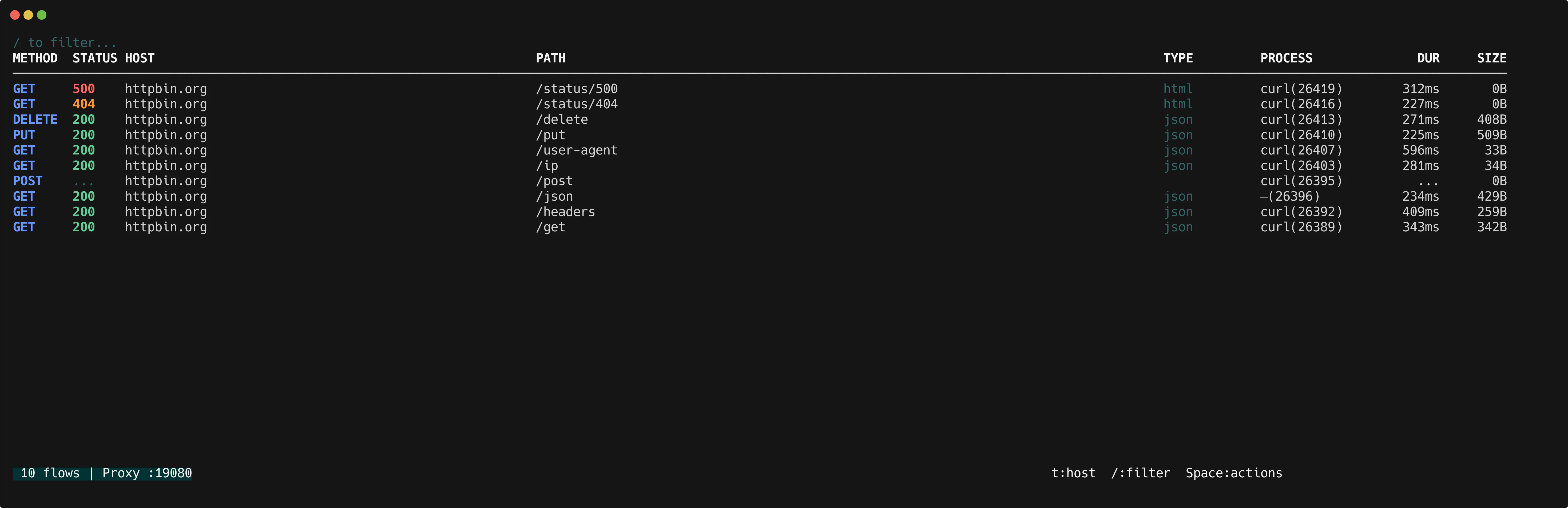
The flow list is the main screen of httpmon. Every intercepted request appears here in real time, newest first.
 ## Color coding
httpmon color-codes both HTTP methods and status codes so you can spot patterns at a glance.
**Methods:**
| Method | Color |
| ------ | ----- |
| GET | Green |
| POST | Blue |
| DELETE | Red |
**Status codes:**
| Range | Color |
| ----- | ------ |
| 2xx | Green |
| 4xx | Yellow |
| 5xx | Red |
## Flow indicators
In-progress flows display a spinner while waiting for a response. Failed flows show an error indicator. Flows paused at a [breakpoint](/features/breakpoints) show a breakpoint state indicator.
## Navigation
Use vim-style keys to move through the list.
| Key | Action |
| ------------------- | ------------------------------------------- |
| `j` / `k` | Move down / up |
| `g` / `G` | Jump to top / bottom |
| `Ctrl+D` / `Ctrl+U` | Half-page down / up |
| `Enter` | Open [flow details](/features/flow-details) |
| `Space` | Open action menu |
## Color coding
httpmon color-codes both HTTP methods and status codes so you can spot patterns at a glance.
**Methods:**
| Method | Color |
| ------ | ----- |
| GET | Green |
| POST | Blue |
| DELETE | Red |
**Status codes:**
| Range | Color |
| ----- | ------ |
| 2xx | Green |
| 4xx | Yellow |
| 5xx | Red |
## Flow indicators
In-progress flows display a spinner while waiting for a response. Failed flows show an error indicator. Flows paused at a [breakpoint](/features/breakpoints) show a breakpoint state indicator.
## Navigation
Use vim-style keys to move through the list.
| Key | Action |
| ------------------- | ------------------------------------------- |
| `j` / `k` | Move down / up |
| `g` / `G` | Jump to top / bottom |
| `Ctrl+D` / `Ctrl+U` | Half-page down / up |
| `Enter` | Open [flow details](/features/flow-details) |
| `Space` | Open action menu |