转载请注明链接:https://blog.csdn.net/feather_wch/article/details/78713109
问题汇总
- 注解作用:为源代码文件提供元数据
- 注解原则:注解不能干扰程序的运行,无论增加或者删除注解,代码都能运行。
- 注解的分类:标准注解(没有元素的注解)、元注解(负责注解其他注解)
- 元注解的作用:编写文档、代码分析、编译检查
- 提取注解:java.lang.reflect.Field有getDeclaredFields()、field.isAnnotationPresent、field.getAnnotation..等方法能够提取注解(参考下面实例)
#Java Annotation 版本:2018/3/25-1(10:18)
[TOC]
##Java Annotation(注解) 1、 @NotEmpty
声明:@NotEmpty的String类、Collection、Map、数组,是不能为null或者长度为0的(String、Collection、Map的isEmpty()方法)。
2、@NotBlank
“The difference to {@code NotEmpty} is that trailing whitespaces are getting ignored.” –> 和{@code NotEmpty}不同的是,尾部空格被忽略,也就是说,纯空格的String也是不符合规则的。所以才会说@NotBlank用于String。
- @NotNull
不能为Null
[TOC]
###1-combine metadata(元数据) with the source-code files
- @Override, 表明一个重载自父类的方法,避免出现方法名错误或者参数写错。
- @Deprecated, 当该元素被使用的时候产生警告。
- @SuppressWarnings, 镇压/关闭掉不合适的编译器警告。
###2-基础语法
	@Test private void test() {
		method();
	}
annotation可以像public等修饰符一样直接使用,这里的@Test稍后会定义该注解。
###3-定义注解 定义如下
import java.lang.annotation.ElementType;
import java.lang.annotation.Retention;
import java.lang.annotation.RetentionPolicy;
import java.lang.annotation.Target;

@Target(ElementType.METHOD) //定义哪里可以使用该注解(Method还是Field)
@Retention(RetentionPolicy.RUNTIME) //定义在源文件的哪里可以获得(class类文件中还是在运行时间Runtime)
//注解Test-类似接口
public @interface Test {
	//注解也有elements(元素),这些元素很像接口方法,但是可以指定初始值
	public int id();
	public String description() default "no description"; //可以有初始值
}
没有elements的注解就是标志注解(marker annotation)
###4-Meta-annotations
| 元注解 | 解释 |
|---|---|
| @Target | 表明该注解用在哪里。ElementType参数有7种:1、CONSTRUCTOR:构造器 2、FIELD:成员变量包括enum constants3、LOCAL_VARIABLE 4、METHOD 5、PACKAGE 6、PARAMETER参数 7、TYPE: Class, interface (including annotation type), or enum枚举 |
| @Retention | 注解信息持续多久. RetentionPolicy参数有3种: 1、SOURCE: 注解会被编译器丢弃 2、CLASS: 通过编译器在class文件都是存在的,但是会被VM丢弃 3、RUNTIME: 通过VM在运行时间内都存在, so they may be read reflectively. |
| @Documented | 在javadocs中包含该注解 |
| @Inherited | 允许子类基础父类的注解 |
###5-注解的作用(优缺点)
- 编写文档:通过代码内部标识的元数据生成文档
- 代码分析:通过代码内部标识的元数据对代码进行分析
- 编译检查:通过代码里标识的元数据让编译器进行一定的编译检查。
###6-实例:反射和注解的配合 姓名
@Target(ElementType.FIELD)
@Retention(RetentionPolicy.RUNTIME)
public @interface UserName {
  public String value() default "Tom";
}
年龄
@Target(ElementType.FIELD)
@Retention(RetentionPolicy.RUNTIME)
public @interface UserAge {
  public int UserAge();
}
利用注解和反射在运行时获得值
public class Annotation {
	/**
	 * 注解:姓名和年龄
	 * */
	@UserName("Alice")
	public String username;
	@UserAge(UserAge=20)
	public int userage;

	public static void main(String[] args) {
		Annotation annotation = new Annotation();
		System.out.println(annotation.username+"-"+annotation.userage);

		//获得annotation的Fields
		Field[] fields = annotation.getClass().getDeclaredFields();
		for(Field field : fields) {
			if(field.isAnnotationPresent(UserAge.class)) {
				UserAge userAge = (UserAge)field.getAnnotation(UserAge.class);
				System.out.println("Age:"+userAge.UserAge()); //获得年龄
			}else if(field.isAnnotationPresent(UserName.class)) {
				UserName userName = (UserName)field.getAnnotation(UserName.class);
				System.out.println("Name:"+userName.value()); //获得名字
			}
		}
	}
}
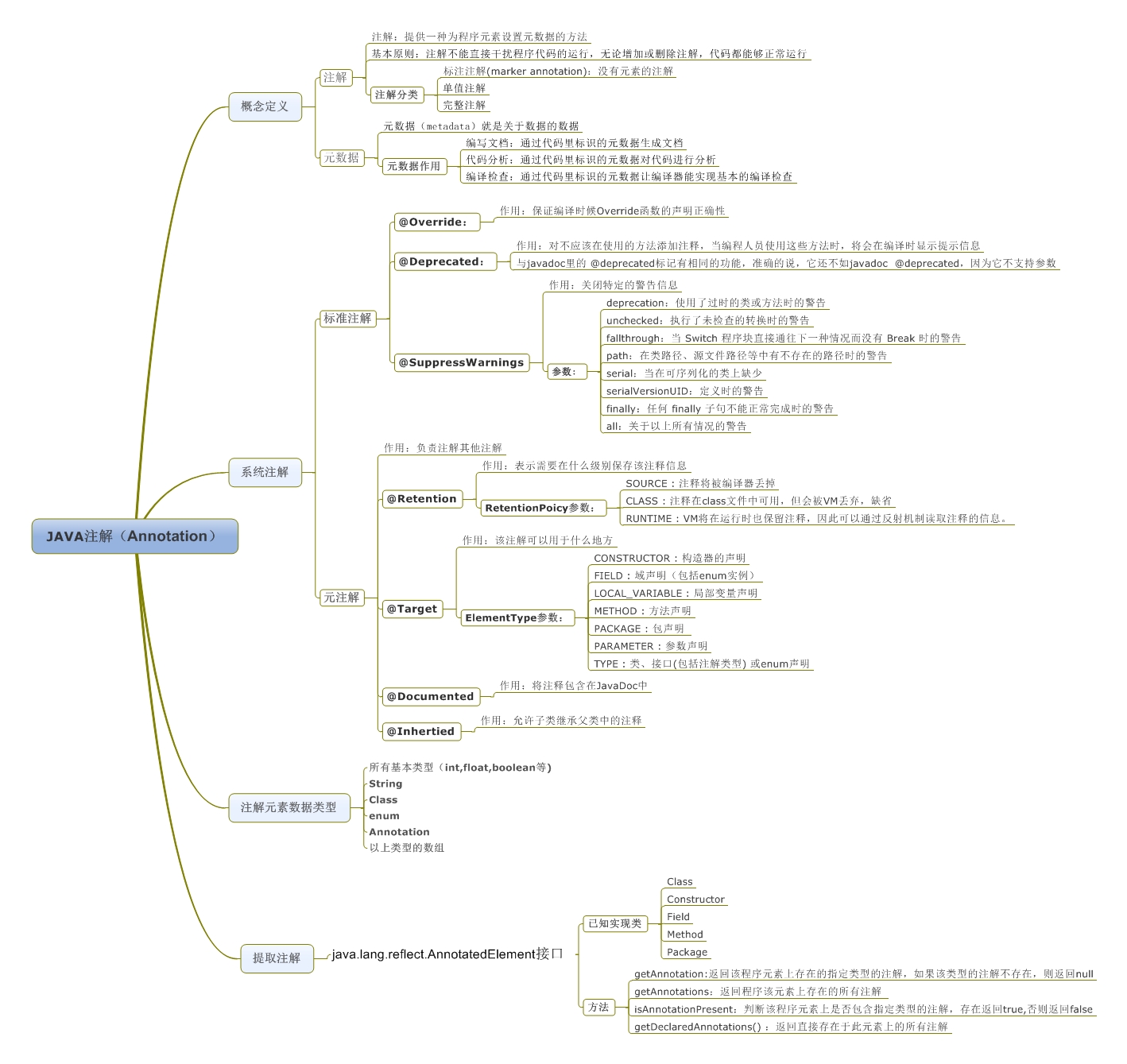
###7-注解知识点图
##Android中注解的使用
##学习和参考资料