
Prepares a merge request description, with link to Jira ticket and current branch commit list.
git mr  [OPTIONS]          [BRANCH]
git mr  [OPTIONS]  open    [BRANCH]
git mr  [OPTIONS]  status  [BRANCH]
git mr  [OPTIONS]  update  [BRANCH]
git mr  [OPTIONS]  merge   [BRANCH]

git mr  [OPTIONS]  menu                     [SEARCH_TERM]
git mr  [OPTIONS]  menu update [--current]  [SEARCH_TERM]
git mr  [OPTIONS]  menu status              [SEARCH_TERM]

git mr  [OPTIONS]  (ip|cr|qa|ok)  [BRANCH]
git mr  [OPTIONS]  undraft        [BRANCH]

git mr hook

git mr base
git mr code
-
BRANCH
Merge request source branch.
(Defaults to current branch.) -
SEARCH_TERM
Term searched in merge requests titles to build menu.
(Defaults to Jira issue code guessed from branch name.)
-c,--codeISSUE_CODE
Force issue code.-t,--targetTARGET_BRANCH
Force target branch.-e,--extended
Use full commit messages in description ("extended", forgit mr [open|update]).
You can also setGIT_MR_EXTENDED=1in your environment variables to always use extended commit descriptions.--no-color
Disable terminal colors.--no-links
Disable terminal hyperlinks and show merge request URL inmr statusandmr menu status.-y,--yes
Bypass confirmation prompts (always answer "yes").-v,--verbose
Verbose output (displays called API URLs).-h
Show help page.
-
git mr update-n,--new-section[NEW_SECTION_TITLE]
Add new section in description for new commits.-r,--replace-commits
Fully replace commit list in description with current commits.
-
git mr menu update--current
Update only current project/branch merge request.
-
git mr merge-f,--force
Force merge even if there are unresolved threads.
bash,gitand usual command-line utilities:grep,sed,curl,head,tail,tr.jqis required and needs to be in PATH.
Note for macOS users:
macOS usually comes with a pretty outdated version of Bash (3.x) and the BSD versions of
grepandsed.
You will need to install a more recent versions of bash (>=4.x) and the GNU versions ofsedandgrep.
These are available on Homebrew:brew install bash gnu-sed grepgit-mr detects these versions, so no additional path adjustments should be necessary.
- Add the
git-mrdirectory to yourPATH
in one of your shell startup scripts:PATH="${PATH}:/path/to/git-mr"
OR
- Define it as a Git alias:
run:or edit yourgit config --global alias.mr '!bash /path/to/git-mr/git-mr'~/.gitconfigdirectly:[alias] mr = "!bash /path/to/git-mr/git-mr"
Completion functions for Bash and Zsh are available:
-
Bash
Sourcegit-mr-completion.bashin one of your shell startup scripts (.bashrc/.bash_profile):. "/path/to/git-mr/git-mr-completion.bash"
-
Zsh
Add thecompletiondirectory to yourfpath(in your.zshrc, before any call tocompinitoroh-my-zsh.sh)fpath=("~/path/to/git-mr/completion" $fpath)
You may have to force a rebuild of
zcompdumpby running:rm -f ~/.zcompdump; compinit
You need to configure the following environment variables:
export JIRA_USER="user.name@mycompany.com"
export JIRA_INSTANCE="mycompany.atlassian.net"
export JIRA_TOKEN="abcdefghijklmnopqrstuvwx"
export JIRA_CODE_PATTERN="[A-Z]{2,3}-[0-9]+"

export GITLAB_DOMAIN="myapp.gitlab.com"
export GITLAB_TOKEN="Zyxwvutsrqponmlkjihg"
To create a Jira API Token, go to:
- https://id.atlassian.com/manage-profile/security/api-tokens
(Account Settings -> Security -> API Token -> Create and manage API tokens)
To create a Gitlab API Token, go to:
- https://myapp.gitlab.com/-/profile/personal_access_tokens?name=Git-MR+Access+token&scopes=api
(Settings -> Access Tokens)
Other optional configuration variables:
# Default labels for new merge requests
export GITLAB_DEFAULT_LABELS="Review,My Team"

# Gitlab status labels (comma-separated, without spaces in between)
export GITLAB_IP_LABELS="WIP"      # Label(s) set on "In Progress" step
export GITLAB_CR_LABELS="Review"   # Label(s) set on "Code Review" step
export GITLAB_QA_LABELS="Testing"  # Label(s) set on "Quality Assurance" step
export GITLAB_OK_LABELS="Accepted" # Label(s) set on "Accepted" step

# Jira status - transition IDs
export JIRA_IP_ID="xx" # "In progress" transition ID
export JIRA_CR_ID="xx" # "Code review" transition ID
export JIRA_QA_ID="xx" # "Quality Assurance" transition ID
export JIRA_OK_ID="xx" # "Accepted" transition ID

# Always use extended commit messages
# export GIT_MR_EXTENDED=1

# Required upvote count to turn indicator green in `mr status` (defaults to 2)
#export GIT_MR_REQUIRED_UPVOTES=2

# Number of description lines shown in `mr menu update` (defaults to 15)
#export GIT_MR_MENU_UPDATE_CONTEXT_LINES=15

# Check "Delete source branch" by default (defaults to 1)
#export GITLAB_DEFAULT_FORCE_REMOVE_SOURCE_BRANCH=1

# Network timeout (in seconds, defaults to 5)
#export GIT_MR_TIMEOUT=5git mr [OPTION...] [BRANCH]
This will print a merge request description, with a link to Jira ticket and current branch commit list.
- Issue code can be guessed from the branch name according to
JIRA_CODE_PATTERN.
It can also be forced with the-c|--codeoption. - Target branch is determined by going up the commit history and finding the first one attached to another local branch.
It can also be forced with the-t|--targetoption.
If a merge request based on the current branch is found on Gitlab, its URL will be provided, along with current votes, open and resolved threads and mergeable status. Otherwise, a link to create a new merge request will be provided.
Default labels and "Delete source branch" status can be configured with the GITLAB_DEFAULT_LABELS and GITLAB_DEFAULT_FORCE_REMOVE_SOURCE_BRANCH environment variables.


git mr [OPTION...] o|op|open [BRANCH]
Similar to git mr, but will open browser directly.
git mr [OPTION...] s|st|status [BRANCH]
Displays a quick summary of the merge request, with useful indicators (tags, target branch, votes, open threads, draft status, ...)

git mr [OPTION...] u|up|update [BRANCH]
This will:
- fetch and display the current merge request description from Gitlab.
- compare the commit lists and update the SHA-1 references in the description
If some commits were changed (after a rebase) or added, you will be prompted if you want to post the updated description to Gitlab.
You can also update the source branch if it is different from the current one.

git mr [OPTION...] menu                       [SEARCH_TERM]
git mr [OPTION...] menu up|update [--current] [SEARCH_TERM]
git mr [OPTION...] menu st|status             [SEARCH_TERM]
Searches for all (non-closed) merge requests with the current issue code in the title, and generates a menu.
-
git mr menu
Prints the markdown menu.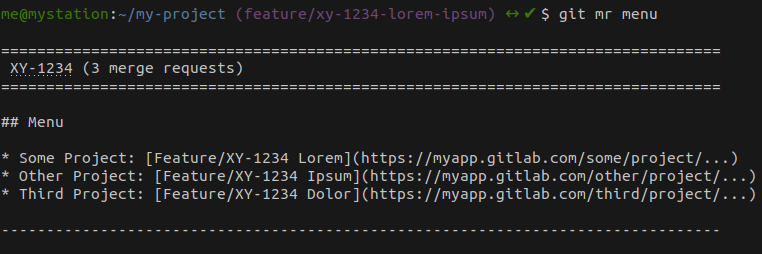
-
git mr menu up|update
Inserts or updates menu in all related merge request descriptions (prompts for confirmation).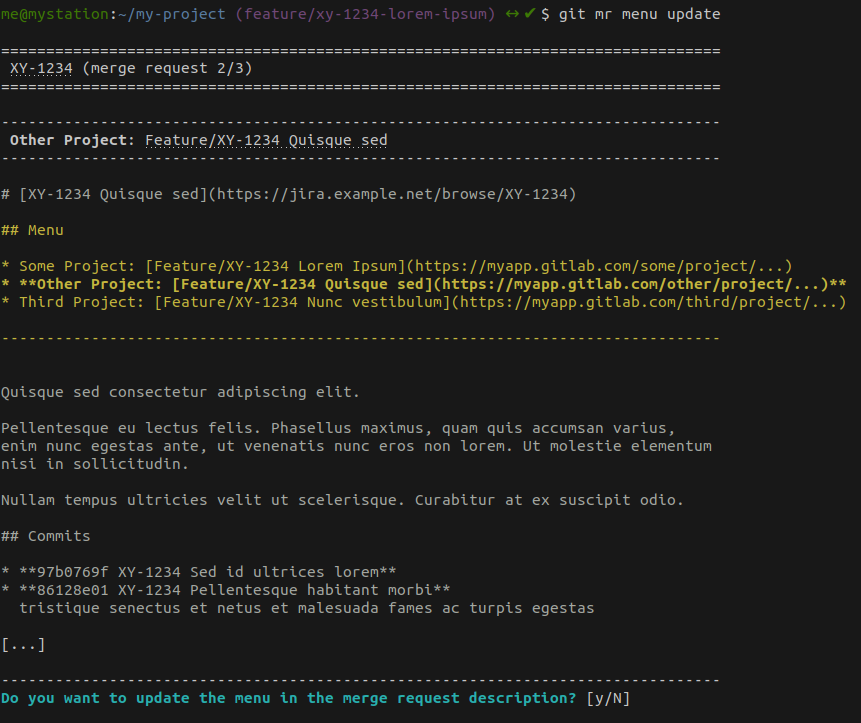
-
git mr menu up|update --current
Inserts or updates menu in current merge request description only (prompts for confirmation). -
git mr menu st|status
Prints menu and status indicators for every related merge request.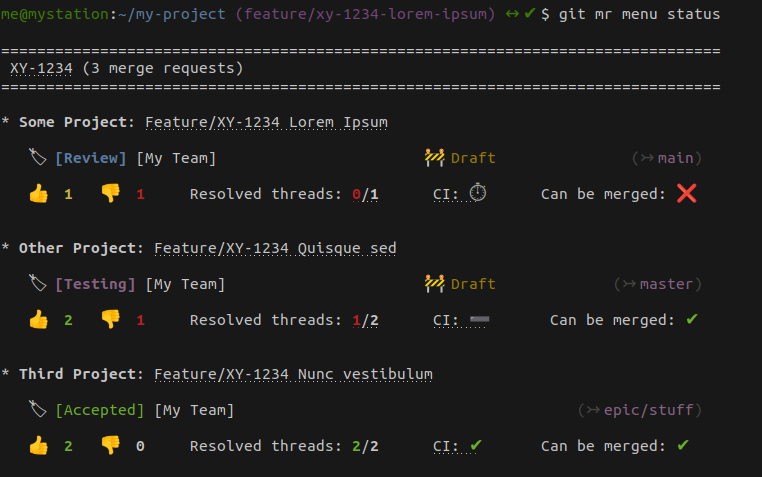


git mr [OPTION...] ip|cr|qa|ok [BRANCH]
This will:
- Set Gitlab labels according to:
GITLAB_IP_LABELSGITLAB_CR_LABELSGITLAB_QA_LABELSGITLAB_OK_LABELS
- transition Jira ticket using ID defined in:
JIRA_IP_IDJIRA_CR_IDJIRA_QA_IDJIRA_OK_ID
- removes Gitlab labels defined in
GITLAB_CR_LABELS,GITLAB_QA_LABELSandGITLAB_OK_LABELS - adds Gitlab labels defined in
GITLAB_IP_LABELS - sets Gitlab draft status
- transitions Jira ticket using
JIRA_IP_ID
- removes Gitlab labels defined in
GITLAB_IP_LABELS,GITLAB_QA_LABELS, andGITLAB_OK_LABELS - adds Gitlab labels defined in
GITLAB_CR_LABELS - transitions Jira ticket using
JIRA_CR_ID
- removes Gitlab labels defined in
GITLAB_IP_LABELS,GITLAB_CR_LABELS, andGITLAB_OK_LABELS - adds Gitlab labels defined in
GITLAB_QA_LABELS - transitions Jira ticket using
JIRA_QA_ID
- removes Gitlab labels defined in
GITLAB_IP_LABELS,GITLAB_CR_LABELS, andGITLAB_QA_LABELS - adds Gitlab labels defined in
GITLAB_OK_LABELS - removes Gitlab draft status
- transitions Jira ticket using
JIRA_OK_ID
git mr [OPTION...] undraft [BRANCH]
This will resolve the Gitlab Draft (Work in Progress) status.
git mr [OPTION...] m|mg|merge [BRANCH]
This will:
- check merge status
- check open threads
- check draft status
and if applicable, will prompt you to:
- resolve draft status
- trigger the merge
- checkout local target branch, update it and delete local merged branch

git mr hook
Adds the prepare-commit-msg Git hook to your current repository.
These "plumbing" commands can be useful in other scripts or git aliases.
Outputs guessed base branch.
Outputs guessed issue code.
The following hooks are provided for convenience:
Ensures your commit messages are prefixed with the code of related issue.
