A real-time visual localization service built on ORB-SLAM3. It exposes a camera-driven SLAM pipeline over a local HTTP interface, enabling live pose streaming, map management, and camera calibration from any browser or REST client.
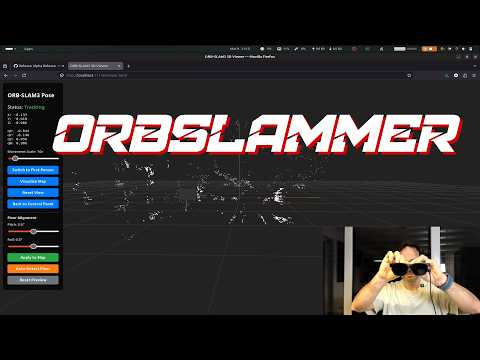
The service captures frames from a camera (USB, V4L2, or any MJPEG/RTSP URL), runs them through ORB-SLAM3, and publishes the resulting camera pose via Server-Sent Events. A web UI is served directly from the process — no separate web server needed.
Key capabilities:
- Live localization against a pre-built map, or active mapping to build a new one
- Pose streaming at ~30 fps over SSE (
/api/stream/pose) - Map management: switch between maps, create new maps, download/upload atlas files
- Camera calibration: chessboard-based calibration via the web UI, with live preview
- Floor alignment: RANSAC-based automatic floor plane detection, or manual pitch/roll adjustment
- CMake ≥ 2.8
- OpenCV ≥ 4.4
- Eigen3 ≥ 3.1
- Boost (serialization)
- DBoW2 and g2o (included in
Thirdparty/) - Sophus (included in
Thirdparty/)
# Build Thirdparty libraries first (DBoW2, g2o)
cd Thirdparty/DBoW2 && mkdir -p build && cd build && cmake .. && make -j4
cd ../../../Thirdparty/g2o && mkdir -p build && cd build && cmake .. && make -j4

# Build the project
mkdir -p build && cd build
cmake ..
ninja localization_service_host   # or: make -j4 localization_service_host

# Optionally build the OSA conversion tool
ninja osa_convert
The main binary is output to localization_service/localization_service_host. The OSA tool is output to localization_service/tools/osa_convert.
You also need the ORB vocabulary file:
cd Vocabulary && tar -xf ORBvoc.txt.tar.gzcd localization_service
./localization_service_host \
../Vocabulary/ORBvoc.txt \
example.yaml \
/dev/video0Open http://localhost:11142 to access the web interface. Once the map looks good, download it via Atlas → Download (.osa file).
./localization_service_host \
    ../Vocabulary/ORBvoc.txt \
    example.yaml \
    /dev/video0 \
    --localize \
--map-id 0The orblsammer_espnode firmware turns an ESP32-S3 with an OV5640 camera and MPU-6050 IMU into a wireless sensor node. The host discovers it automatically via UDP broadcast and drives it over a single persistent TCP connection.
# Auto-discover the node
./localization_service_host \
    ../Vocabulary/ORBvoc.txt \
    example.yaml \
    espnode \
    --espnode-fps 10

# Connect directly by IP (skip discovery wait)
./localization_service_host \
    ../Vocabulary/ORBvoc.txt \
    example.yaml \
    espnode:192.168.1.42 \
    --espnode-fps 15 \
    --localize
The host sends a single-byte trigger at the configured FPS rate; the node responds with a JPEG frame. IMU data (roll/pitch/yaw + velocity) is streamed continuously at ~20 Hz between frames over the same connection. See ESP32 sensor node for hardware details.
| Source | Example value |
|---|---|
| USB/V4L2 device number | 0 |
| V4L2 device path | /dev/video2 |
| MJPEG / RTSP stream | http://192.168.1.10:4747/video |
| Tello drone | use tools/tello_camera_server.py then point to its output URL |
| ESP32 sensor node (auto-discover) | espnode |
| ESP32 sensor node (fixed IP) | espnode:192.168.1.42 |
| External push (API) | none — frames are submitted via POST /api/frame |
When started with none or espnode, the service uses the ingest queue path instead of VideoCapture. See Frame ingest and Single-shot localization.
All options after the three required positional arguments are named flags:
| Flag | Description |
|---|---|
--localize |
Start in localization-only mode (disables new map creation) |
--map-id <n> |
Map index to activate on startup (default: 0) |
--port <n> |
HTTP server port (default: 11142) |
--espnode-fps <n> |
Frame trigger rate when using an ESP32 node (default: 10) |
All endpoints are served on port 11142.
| Method | Path | Description |
|---|---|---|
GET |
/api/status |
JSON snapshot of current system state (see below) |
GET |
/pause |
Pause frame processing |
GET |
/resume |
Resume frame processing |
GET |
/loc |
Switch to localization mode (disables new map creation) |
GET |
/map |
Switch to mapping mode |
GET |
/switchmap?id=N |
Switch active map to id N |
GET |
/newmap |
Create and switch to a new empty map |
GET |
/allow_new_maps?enable=true|false |
Enable or disable automatic new-map creation when tracking is lost |
/api/status response:
{
  "localizationMode": false,
  "allowMapCreation": true,
  "paused": false,
  "currentMapId": 1,
  "maps": [
    { "id": 0, "keyframes": 142, "mappoints": 3891 },
    { "id": 1, "keyframes": 67,  "mappoints": 1204 }
  ]
}| Method | Path | Description |
|---|---|---|
GET |
/api/stream/pose |
Server-Sent Events stream of camera pose at ~30 fps |
Each event is a JSON object:
{ "valid": true, "x": 0.1, "y": -0.3, "z": 0.8, "qx": 0, "qy": 0, "qz": 0, "qw": 1 }When tracking is lost: { "valid": false }
| Method | Path | Description |
|---|---|---|
POST |
/api/frame?ts=T |
Submit a JPEG frame for tracking; returns current pose as JSON |
POST |
/api/frame (empty body) |
Query current pose without submitting a frame |
The request body must be a raw JPEG. Optional query parameters:
| Parameter | Description |
|---|---|
ts |
Timestamp in milliseconds (monotonic clock). Defaults to server time if omitted. |
ax, ay, az |
Accelerometer reading m/s² (enables IMU path when all provided) |
gx, gy, gz |
Gyroscope reading rad/s |
Response (both variants):
{
  "queued": true,
  "tracking_state": "OK",
  "pose": { "valid": true, "x": 1.23, "y": 0.45, "z": 0.67,
            "qx": 0.0, "qy": 0.0, "qz": 0.0, "qw": 1.0 }
}
queued: false is returned when the body is empty (pose-only query). tracking_state is one of OK, RECENTLY_LOST, LOST, NOT_INITIALIZED. HTTP 503 is returned when the ingest queue is full — the client should drop the frame and retry.
| Method | Path | Description |
|---|---|---|
GET |
/api/map/points |
All map points as a JSON array [{x,y,z}, ...] |
GET |
/api/map/auto_align_floor |
RANSAC floor plane detection and rotation correction |
GET |
/api/map/align_floor?pitch=P&roll=R |
Manual floor alignment (radians) |
| Method | Path | Description |
|---|---|---|
GET |
/api/atlas/download |
Download current atlas as atlas.osa |
POST |
/api/atlas/upload |
Upload a .osa file to replace the current atlas |
| Method | Path | Description |
|---|---|---|
GET |
/api/calibrate/mode?enable=true |
Enter calibration mode (pauses SLAM) |
GET |
/api/calibrate/mode?enable=false |
Exit calibration mode |
GET |
/api/calibrate/capture[?size=S] |
Capture current frame for calibration (square size in metres) |
GET |
/api/calibrate/status |
JSON: capture count, last result, active state |
GET |
/api/calibrate/image |
JPEG of the last captured frame with corners drawn |
GET |
/api/calibrate/compute |
Run calibration from captured frames, apply to SLAM |
GET |
/api/calibrate/apply?fx=..&fy=..&cx=..&cy=..&k1=..&k2=..&p1=..&p2=..&k3=.. |
Apply known intrinsics directly |
Everything else under / is served from localization_service/html/. The default page (/) loads index.html.
While the service is running, commands can be typed directly in the terminal:
| Command | Action |
|---|---|
loc / localize |
Switch to localization mode |
map / mapping |
Switch to mapping mode |
newmaps_on |
Enable automatic new-map creation on tracking loss |
newmaps_off |
Disable automatic new-map creation (continuously retry relocalization instead) |
pause |
Pause processing |
resume |
Resume processing |
quit / exit |
Shut down cleanly |
Camera intrinsics and the active map can be set at runtime through the web interface — a correctly tuned YAML file is not required to get started.
- Calibration: use the Calibration page to capture chessboard frames and compute intrinsics, or enter known values directly via
/api/calibrate/apply. The result is applied to the running SLAM system immediately. - Map: upload a previously saved
.osaatlas file via Atlas → Upload, or download the current map via Atlas → Download to reuse across sessions.
A minimal YAML file is still needed to launch the process (it sets sensor type, image size, and ORB feature count). See localization_service/example.yaml for a starting template. The format follows the ORB-SLAM3 settings specification — refer to README_ORB_SLAM.md for full documentation.
The following keys extend the standard ORB-SLAM3 settings file with project-specific behaviour.
| Key | Type | Default | Description |
|---|---|---|---|
loopClosing |
0 or 1 |
1 |
Enable or disable the loop-closing / map-merging thread. Even when 0, keyframes are still inserted into the place-recognition database so that relocalization works. |
mergeMinBoWMatches |
int | 10 |
Minimum number of BoW descriptor matches required between a query keyframe and a merge candidate before geometric validation is attempted. Lower values make merging easier across maps with sparse visual overlap (typical for monocular). |
mergeMinBoWInliers |
int | 7 |
Minimum number of RANSAC inliers required during Sim3 estimation. Must be ≤ mergeMinBoWMatches. |
mergeMinSim3Inliers |
int | 20 |
Minimum inliers after Sim3 graph optimisation. |
mergeMinProjMatches |
int | 50 |
Minimum projection matches (coarse pass) after Sim3 alignment. |
mergeMinProjOptMatches |
int | 80 |
Minimum projection matches (refined pass). This is the final gate before a merge is confirmed. |
The merge pipeline is cascaded: a candidate must pass every stage in order. The Sim3 and projection stages remain strict even when the BoW thresholds are lowered, so false-positive merges are unlikely. Additionally, a merge is only triggered after 3 consecutive keyframes all pass the full pipeline.
| Key | Type | Default | Description |
|---|---|---|---|
| (no YAML key — runtime only) | — | — | Whether to create a new map when tracking is lost is controlled at runtime via /allow_new_maps or the newmaps_on / newmaps_off console commands. When the service is started in localize_only mode this is automatically disabled. |
A device that needs a one-off position fix (rather than continuous tracking) can use the frame ingest endpoint without running a local camera loop.
Start the service in localization-only mode with none as the camera source:
./localization_service/localization_service_host \
    ../Vocabulary/ORBvoc.txt \
    example.yaml \
    none \
    --localize \
    --map-id 0
Then from the device (Python example, requires opencv-python and requests):
import time
import cv2
import requests

SERVER = "http://localization-host:11142/api/frame"
session = requests.Session()

def get_pose(frame) -> dict | None:
    """Submit one frame and return the pose once tracking confirms it."""
    _, buf = cv2.imencode(".jpg", frame)
    # Submit the frame; response contains the pose from the previous frame.
    r = session.post(SERVER, data=buf.tobytes(),
                     params={"ts": f"{time.monotonic()*1000:.3f}"},
                     headers={"Content-Type": "image/jpeg"}, timeout=1.0)
    if r.status_code != 200:
        return None

    # Poll with an empty body until this frame has been processed.
    for _ in range(20):
        r = session.post(SERVER, data=b"", timeout=1.0)
        data = r.json()
        if data["tracking_state"] == "OK" and data["pose"]["valid"]:
            return data["pose"]
        time.sleep(0.05)
    return None

cap = cv2.VideoCapture(0)
ret, frame = cap.read()
pose = get_pose(frame)
if pose:
    print(f"Position: x={pose['x']:.3f}  y={pose['y']:.3f}  z={pose['z']:.3f}")
The empty-body POST is a lightweight pose-only query — it does not submit a frame to the tracker. The poll loop typically converges in 1–3 iterations (50–150 ms) once the system is already localized.
A ready-to-run streaming version that forwards a full camera feed is provided in tools/send_camera_frames.py.
The localization_service/tools/ directory contains tools for working with .osa map files outside of a live SLAM session.
Converts an .osa atlas to/from a portable JSON representation. Useful for inspecting, editing, or programmatically constructing maps.
# Serialize an atlas to JSON (binary blobs are base64-encoded)
./localization_service/tools/osa_convert dump  Session.osa  atlas.json

# Pack the JSON back into a loadable .osa file
./localization_service/tools/osa_convert pack  atlas.json   output.osa
The JSON contains every serialized field: vocabulary metadata, all Maps, KeyFrames (pose, descriptors, keypoints, BoW vectors, covisibility, spanning tree, IMU state), and MapPoints (world position, descriptor, observations, depth limits). Full round-trips are lossless: 284 KFs / 7271 MPs dump and pack back identically.
Build with:
cd build && ninja osa_convertA Python module that wraps osa_convert to provide high-level read/write access to OSA atlas files from Python scripts.
from localization_service.tools.osa_file import OsaAtlas

atlas = OsaAtlas.load("Session.osa")
m = atlas.maps[0]

# NumPy arrays for all 3D data
pts    = m.world_points()      # (N, 3) float32 — MapPoint world coordinates
cams   = m.camera_centers()    # (K, 3) float32 — KeyFrame camera positions

# Access individual elements
kf = m.keyframes[0]
print(kf.timestamp, kf.fx, kf.descriptors.shape)   # e.g. (1506, 32)

mp = m.mappoints[0]
print(mp.world_pos, mp.descriptor.shape)            # e.g. (32,)

# Round-trip save
atlas.save("output.osa")

# Create a blank atlas for building a map from scratch
atlas = OsaAtlas.new("ORBvoc.txt", "checksum")
These tools are the foundation for an offline atlas-construction pipeline that can build higher-quality maps from a directory of images using techniques not available in the real-time tracker.
localization_service/
  src/
    localization_service_host.cc  — main(): SLAM init, tracking loop
    espnode_source.cc             — ESP32 TCP session, IMU buffer, frame ingest
    slam_state.cc                 — shared atomic flags and pose state
    calibration_manager.cc        — chessboard calibration logic
    web_server.cc                 — HTTP server and all route handlers
    ingest_queue.cc               — IngestQueue push/pop implementation
  include/localization_service/
    args.h                        — ServiceArgs struct, parseArgs() (all CLI flags)
    config.h                      — port define (11142) and tuning constants
    slam_state.h                  — LifecycleFlags, PoseState
    ingest_queue.h                — IngestFrame, IngestQueue (frame push API)
    espnode_source.h              — ImuSample, ImuBuffer, EspnodeSource
    calibration_manager.h         — CalibrationManager
    web_server.h                  — WebServer
  html/
    index.html                    — main web UI
    viewer.html                   — pose and map viewer
    calibration.html              — calibration assistant
  tools/
    osa_convert.cc                — C++ source for OSA ↔ JSON converter
    osa_convert                   — built binary (OSA ↔ JSON CLI)
    osa_file.py                   — Python module for reading/writing OSA files
    tello_camera_server.py        — relay server for Tello drone camera
    send_camera_frames.py         — forward a local camera to the frame ingest API
    record_frames.py              — record frames to disk for offline processing
    replay_frames.py              — replay recorded frames into the ingest API
  example.yaml                    — sample camera configuration

Thirdparty/orblsammer_espnode/
  src/
    xostudio_hud.ino              — PlatformIO firmware (persistent TCP + HTTP IMU)
    test_tcp_hud.py               — Python test client (discovery, triggers, IMU stream)
  platformio.ini                  — PlatformIO build config (freenove_esp32_s3_wroom)
The ESP32-S3 firmware in Thirdparty/orblsammer_espnode/ implements a lightweight sensor node that streams camera frames and IMU data over WiFi.
| Component | Detail |
|---|---|
| MCU | Freenove ESP32-S3 WROOM (PSRAM) |
| Camera | OV5640 — QVGA, JPEG quality 12 |
| IMU | MPU-6050 on I2C (SDA=21, SCL=20) — roll/pitch/yaw + velocity via accIntegral |
| Storage | SD/MMC — optional, holds WiFi credentials in /config.txt |
All packets share a 9-byte packed little-endian header:
uint8_t  packet_type   // 0x01=IMAGE  0x02=IMU  0x03=TRIGGER(host→device)
uint32_t frame_time    // ESP32 millis()
uint32_t total_size    // payload byte count
IMU payload: N × 6 × float32 — roll, pitch, yaw (radians), vx, vy, vz (mm/s).
The host drives the session:
- Trigger (
0x03, 1 byte, no header) — host → ESP32 to request one JPEG frame. At most one trigger is in-flight at a time; the next is held until the IMAGE response arrives. - IMU stream — ESP32 pushes accumulated IMU frames every 50 ms automatically, independent of triggers.
pio run -t upload          # compile and flash via PlatformIO
pio device monitor         # serial console at 115200 baud
WiFi credentials can be provisioned without recompiling via the serial console:
> setwifi
Enter SSID:
> MyNetwork
Enter password:
> ••••••••
Saved SSID 'MyNetwork' to /config.txt
Reconnecting...
Connected. IP: 192.168.1.42
Other serial commands: status (print WiFi/SD/TCP state), help.
Alternatively, write credentials to /config.txt on the SD card directly (line 1 = SSID, line 2 = password).
python Thirdparty/orblsammer_espnode/src/test_tcp_hud.py        # 5 fps (default)
python Thirdparty/orblsammer_espnode/src/test_tcp_hud.py 15     # 15 fps
The test client auto-discovers the node via UDP, opens a persistent TCP connection, sends triggers at the configured FPS, and displays incoming frames and IMU readings.
This service is built on top of ORB-SLAM3, a feature-based monocular/stereo/RGB-D SLAM system developed at the University of Zaragoza. See README_ORB_SLAM.md for the original documentation and ORB-SLAM3 paper for the academic reference.
Modifications to the ORB-SLAM3 core:
- Pangolin visualizer made optional (no display required)
ForceRelocalization(),SwitchToMap(), andSetAllowMapCreation()APIs addedChangeCalibration()API added for runtime intrinsics updates- KeyFrameDatabase scoped correctly per-map to fix cross-map relocalization
- New-map creation on tracking loss is now optional and togglable at runtime; when disabled the system continuously retries relocalization against the existing map
- Loop closing enabled by default; merge detection thresholds are configurable via YAML to handle monocular environments with sparse cross-map BoW overlap
- Fixed an infinite-loop bug in
KeyFrameDatabase::DetectNBestCandidatestriggered by bad keyframes mid-iteration