
Generate realistic, human-like mouse movement data between coordinates or navigate between elements with playwright like the definitely-not-robot you are.
Oh yeah? Could a robot do this?
This fork is published to GitHub Packages. First, ensure you have a .npmrc file configuring GitHub Packages for this scope:
@phanthai12:registry=https://npm.pkg.github.com
//npm.pkg.github.com/:_authToken=YOUR_GITHUB_TOKEN
Then, you can install it via yarn:
yarn add @phanthai12/playwright-ghost-cursoror with npm:
npm install @phanthai12/playwright-ghost-cursorGenerating movement data between 2 coordinates.
import { path } from "@phanthai12/playwright-ghost-cursor";

const from = { x: 100, y: 100 };
const to = { x: 600, y: 700 };

const route = path(from, to);

/**
 * [
 *   { x: 100, y: 100 },
 *   { x: 108.75573501957051, y: 102.83608396351725 },
 *   { x: 117.54686481838543, y: 106.20019239793275 },
 *   { x: 126.3749821408895, y: 110.08364505509256 },
 *   { x: 135.24167973152743, y: 114.47776168684264 }
 *   ... and so on
 * ]
 */
Generating movement data between 2 coordinates with timestamps.
import { path } from "@phanthai12/playwright-ghost-cursor";

const from = { x: 100, y: 100 };
const to = { x: 600, y: 700 };

const route = path(from, to, { useTimestamps: true });

/**
 * [
 *   { x: 100, y: 100, timestamp: 1711850430643 },
 *   { x: 114.78071695023473, y: 97.52340709495319, timestamp: 1711850430697 },
 *   { x: 129.1362373468682, y: 96.60141853603243, timestamp: 1711850430749 },
 *   { x: 143.09468422606352, y: 97.18676354029148, timestamp: 1711850430799 },
 *   { x: 156.68418062398405, y: 99.23217132478408, timestamp: 1711850430848 },
 *   ... and so on
 * ]
 */
Usage with playwright:
import { GhostCursor } from "@phanthai12/playwright-ghost-cursor";
import { chromium } from "playwright";

const run = async (url) => {
    const selector = "#sign-up button";
    const browser = await chromium.launch({ headless: false });
    const context = await browser.newContext();
    const page = await context.newPage();
    const cursor = new GhostCursor(page);
    await page.goto(url);
    const element = page.locator(selector);
    await element.waitFor();
    await cursor.click(element);
    // shorthand for
    // await cursor.move(selector)
    // await cursor.click()
};cursor.move()will automatically overshoot or slightly miss and re-adjust for elements that are too far away from the cursor's starting point.- When moving over objects, a random coordinate that's within the element will be selected instead of hovering over the exact center of the element.
- The speed of the mouse will take the distance and the size of the element you're clicking on into account.
- Native Playwright API (
page.mouse) is used, ensuring compatibility with all major browsers supported by Playwright (Chromium, Firefox, WebKit).

Ghost cursor in action on a form
Creates the ghost cursor that contains the action functions described below.
/**
 * @param page Playwright `page`.
 * @param start (optional) Cursor start position. Default is `{ x: 0, y: 0 }`.
 * @param performRandomMoves (optional) Initially perform random movements. Default is `false`.
 * @param defaultOptions (optional) Set custom default options for `click`, `move`, `moveTo`, and `randomMove` functions.
 * @param visible (optional) Make the cursor visible, using `installMouseHelper()`. Default is `false`.
 */
new GhostCursor(page: Page, { start?: Vector, performRandomMoves?: boolean, defaultOptions?: DefaultOptions, visible?: boolean = false }): GhostCursorToggles random mouse movements on or off.
/**
 * @param random boolean to toggle random movements on or off.
 */
toggleRandomMove(random: boolean): voidSimulates a mouse click at the specified selector or element.
/**
 * @param selector (optional) CSS selector or Locator to identify the target element.
 * @param options (optional) Additional options for clicking. Extends the `options` of the `move`, `scrollIntoView`, and `getElement` functions.
 *  - hesitate (number): Delay before initiating the click action in milliseconds. Default is 0.
 *  - waitForClick (number): Delay between mousedown and mouseup in milliseconds. Default is 0.
 *  - moveDelay (number): Delay after moving the mouse in milliseconds. Default is 2000. If randomizeMoveDelay=true, delay is randomized from 0 to moveDelay.
 *  - button (MouseButton): Mouse button to click. Default is left.
 *  - clickCount (number): Number of times to click the button. Default is 1.
 */
click(selector?: string | Locator, options?: ClickOptions): Promise<void>Moves the mouse to the specified selector or element.
/**
 * @param selector CSS selector or Locator to identify the target element.
 * @param options (optional) Additional options for moving. Extends the `options` of the `scrollIntoView` and `getElement` functions.
 *  - paddingPercentage (number): Percentage of padding to be added inside the element when determining target point. Default is 0. 100 will always move to center of element.
 *  - destination (Vector): Destination to move the cursor to, relative to the top-left corner of the element. If specified, paddingPercentage is not used. If not specified (default), destination is random point within the paddingPercentage.
 *  - moveDelay (number): Delay after moving the mouse in milliseconds. Default is 0.
 *  - randomizeMoveDelay (boolean): Randomize delay between actions from 0 to moveDelay. Default is true.
 *  - maxTries (number): Maximum number of attempts to mouse-over the element. Default is 10.
 *  - moveSpeed (number): Speed of mouse movement. Default is random.
 *  - overshootThreshold (number): Distance from current location to destination that triggers overshoot to occur. Default is 500.
 */
move(selector: string | Locator, options?: MoveOptions): Promise<void>Moves the mouse to the specified destination point.
/**
 * @param destination An object with `x` and `y` coordinates representing the target position. For example, `{ x: 500, y: 300 }`.
 * @param options (optional) Additional options for moving.
 *  - moveSpeed (number): Speed of mouse movement. Default is random.
 *  - moveDelay (number): Delay after moving the mouse in milliseconds. Default is 0.
 *  - randomizeMoveDelay (boolean): Randomize delay between actions from 0 to moveDelay. Default is true.
 */
moveTo(destination: Vector, options?: MoveToOptions): Promise<void>Moves the mouse by a specified amount.
/**
 * @param delta An object with `x` and `y` coordinates representing the distance to move. For example, `{ x: 10, y: 20 }`.
 * @param options (optional) Additional options for moving. Same as `moveTo` options.
 */
moveBy(delta: Partial<Vector>, options?: MoveToOptions): Promise<void>Scrolls the element into view. If already in view, no scroll occurs.
/**
 * @param selector CSS selector or Locator to identify the target element.
 * @param options (optional) Additional options for scrolling. Extends the `options` of the `getElement` and `scroll` functions.
 *  - scrollSpeed (number): Scroll speed (when scrolling occurs). 0 to 100. 100 is instant. Default is 100.
 *  - scrollDelay (number): Time to wait after scrolling (when scrolling occurs). Default is 200.
 *  - inViewportMargin (number): Margin (in px) to add around the element when ensuring it is in the viewport. Default is 0.
 */
scrollIntoView(selector: string | Locator, options?: ScrollIntoViewOptions): Promise<void>Scrolls to the specified destination point.
/**
 * @param destination An object with `x` and `y` coordinates representing the target position. Can also be "top", "bottom", "left" or "right".
 * @param options (optional) Additional options for scrolling. Extends the `options` of the `scroll` function.
 */
scrollTo(destination: Partial<Vector> | 'top' | 'bottom' | 'left' | 'right', options?: ScrollOptions): Promise<void>Scrolls the page the distance set by delta.
/**
 * @param delta An object with `x` and `y` coordinates representing the distance to scroll from the current position.
 * @param options (optional) Additional options for scrolling.
 *  - scrollSpeed (number): Scroll speed. 0 to 100. 100 is instant. Default is 100.
 *  - scrollDelay (number): Time to wait after scrolling. Default is 200.
 */
scroll(delta: Partial<Vector>, options?: ScrollOptions): Promise<void>Mouse button up or down.
/**
 * @param options (optional) Additional options for mouse action.
 *  - button (MouseButton): Mouse button to click. Default is left.
 *  - clickCount (number): Number of times to click the button. Default is 1.
 */
mouseDown(options?: MouseButtonOptions): Promise<void>
mouseUp(options?: MouseButtonOptions): Promise<void>Gets the element via a selector. Can use an XPath.
/**
 * @param selector CSS selector or Locator to identify the target element.
 * @param options (optional) Additional options.
 *  - waitForSelector (number): Time to wait for the selector to appear in milliseconds.
 */
getElement(selector: string | Locator, options?: GetElementOptions): Promise<Locator>Get current location of the cursor.
getLocation(): VectorInstalls a mouse helper on the page, making the pointer visible. Gets executed in the GhostCursor initialization when passing visible=true. Use for debugging only.
/**
 * @param page Playwright `page` where the mouse helper should be installed.
 */
installMouseHelper(page: Page): Promise<void>Gets a random point on the browser window.
/**
 * @param page Playwright `page`.
 */
getRandomPagePoint(page: Page): Promise<Vector>Generates a set of points for mouse movement between two coordinates.
/**
 * @param start Starting point of the movement.
 * @param end Ending point (or bounding box) of the movement.
 * @param options (optional) Additional options for generating the path.
 *  - spreadOverride (number): Override the spread of the generated path.
 *  - moveSpeed (number): Speed of mouse movement. Default is random.
 *  - useTimestamps (boolean): Generate timestamps for each point based on the trapezoidal rule.
 */
path(start: Vector, end: Vector | BoundingBox, options?: PathOptions): Vector[] | TimedVector[]Bezier curves do almost all the work here. They let us create an infinite amount of curves between any 2 points we want and they look quite human-like. (At least moreso than alternatives like perlin or simplex noise)
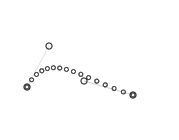
The magic comes from being able to set multiple points for the curve to go through. This is done by picking 2 coordinates randomly in a limited area above and under the curve.
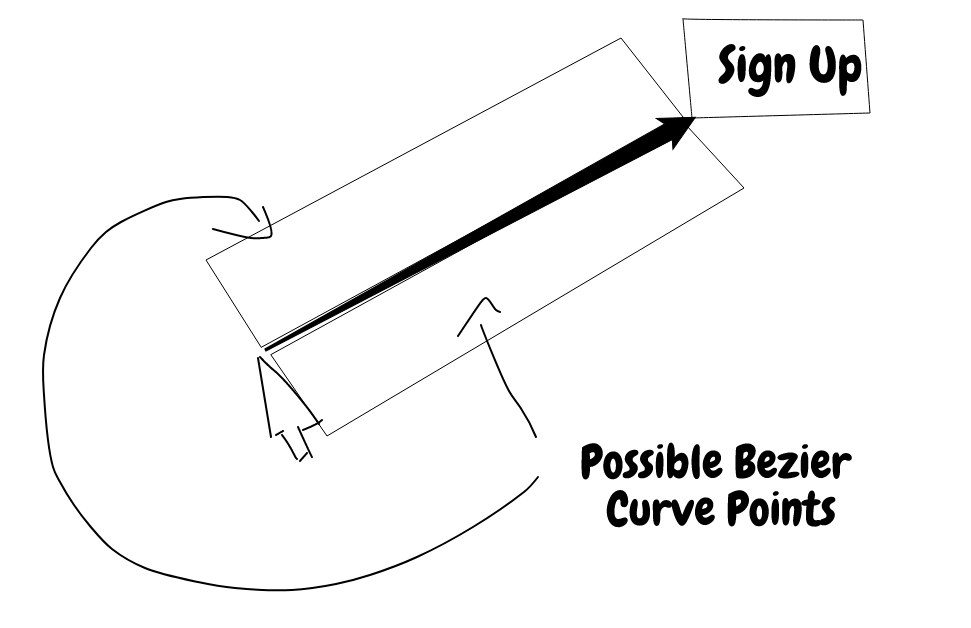
However, we don't want wonky looking cubic curves when using this method because nobody really moves their mouse that way, so only one side of the line is picked when generating random points.
- OSX:
DEBUG="ghost-cursor:*" - Linux:
DEBUG="ghost-cursor:*" - Windows CMD:
set DEBUG=ghost-cursor:* - Windows PowerShell:
$env:DEBUG = "ghost-cursor:*"
This project is a fork of ghost-cursor originally created by Xetera. All credit for the foundation and human-like movement algorithms goes to the original author. This fork adapts the library to integrate seamlessly with Playwright.